Working time recording on your own Microsoft 365

Daily recording, monthly sign-off and leave management in a Power Apps application installed in your environment. Your team signs in with their corporate account from Teams, the browser or a mobile phone.

Three things, done well

Each day's record, each month's sign-off and the whole year's leave, in a single traceable process that can be consulted in seconds.

Daily recording

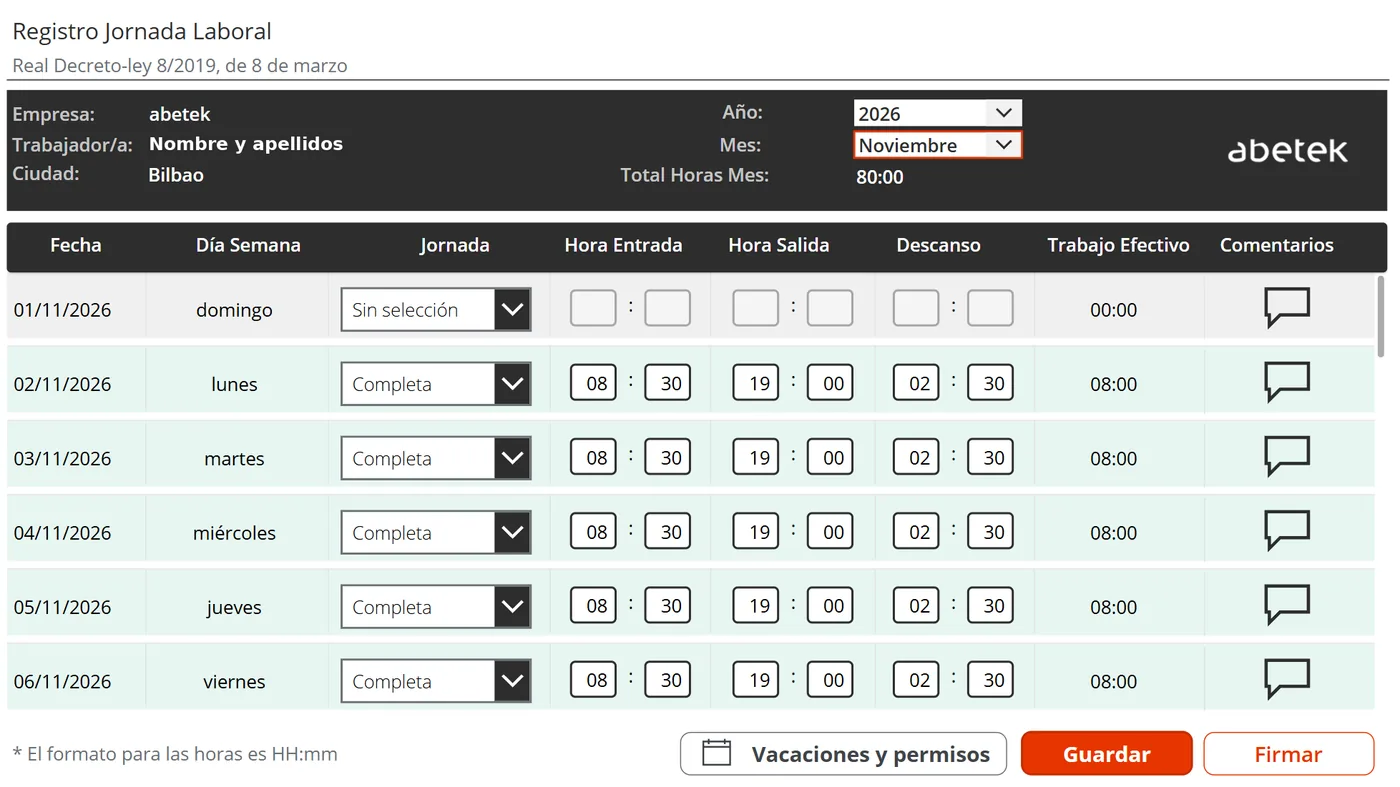
Each person records their working day in seconds. The timetable for their type of working day is suggested automatically and they only correct what changes; effective working time and the monthly total are calculated automatically.

  • One row per day, with the day of the week already worked out
  • Types of working day and timetables according to your collective agreement
  • Comments to explain a day that differs from the usual

Monthly sign-off

When the month closes, each person accepts the terms and signs their record. The month is closed and a PDF statement is generated, filed in your SharePoint and sent by email.

  • Sign-off terms reviewed by your employment advisers
  • Statement that can be found by person and by month
  • Configurable month closing day

Leave and absences

Requests with the balance in view, approval from email and public holidays managed per workplace. Approved leave already appears marked in the time record.

  • Working days calculated without weekends or public holidays
  • The manager approves or rejects from the email itself
  • Balances per person and year, carrying over unused days
Daily recording screen of abetek's working time recording application

The problem is not recording: it is proving it

Spreadsheets scattered across folders and emails work until the day someone asks to see the record for a particular month.

  • Every day for every person, in one place.
  • Individual sign-off: each month is closed by the person who worked it.
  • A given month, found in seconds rather than hours.
  • Leave and the time record match, because they come from the same data.

On your own Microsoft 365

The application is built with Power Apps, SharePoint lists and Power Automate, and is installed inside your environment. There are no servers to maintain and no third-party services in between.

Your data, in your environment

Your staff's data is stored in your organisation's SharePoint and does not leave it.

With standard licences

It works with standard Microsoft 365 licences, with no premium connectors, and installation does not require global administrator permissions.

Where your team already works

As a tab or app in Teams, in the browser or on a mobile phone. Nothing to install and no separate usernames or passwords.

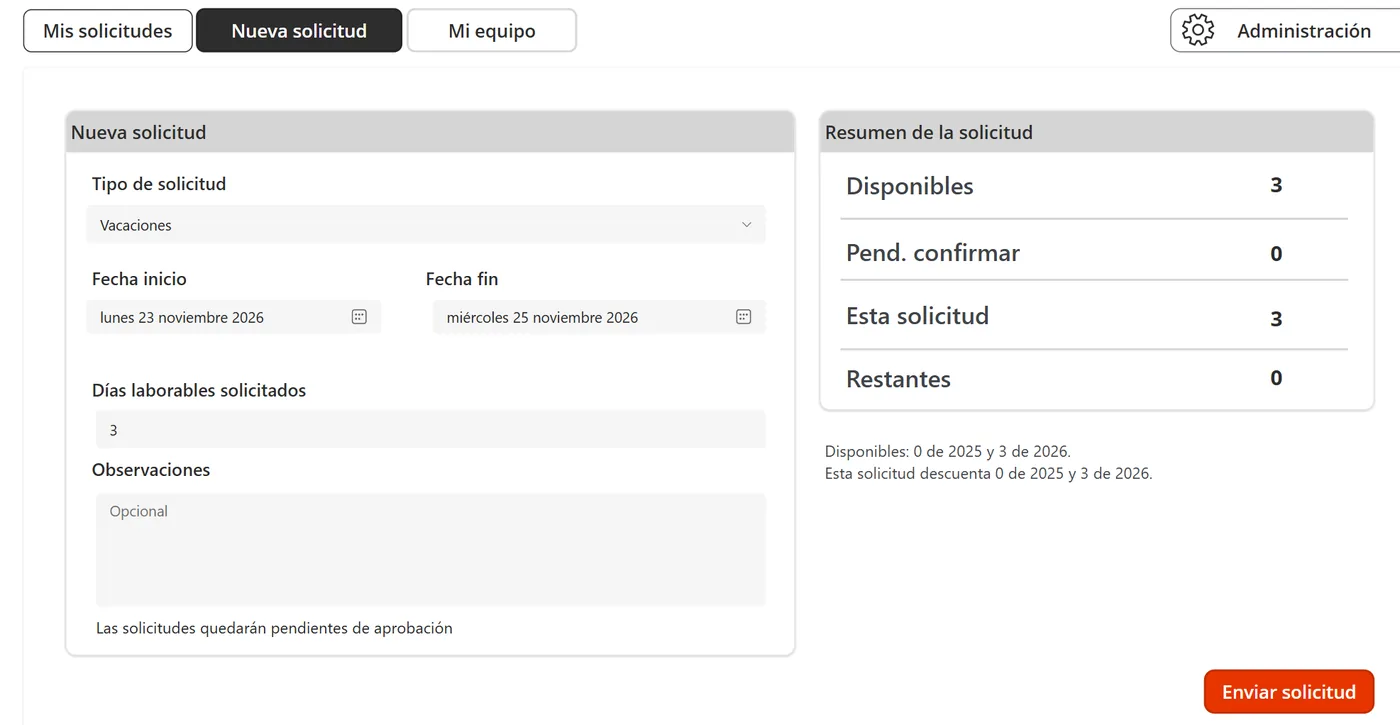
Leave request screen with the balance summary

Leave without spreadsheets

Each person sees their balance before requesting, and each manager sees who will be away and when.

  • The request shows its effect on the balance before it is sent.
  • If there are days left from the previous year, they are used first.
  • Unanswered requests expire on their own and the days are returned.
  • The administrators manage balances and public holidays for the whole organisation.

How we get it up and running

No two companies work alike, so everything is adjusted to your collective agreement and your procedures.

  1. Demonstration

    We show you the application running, with sample data, before you decide anything.

  2. Adjustment to your collective agreement

    Types of working day and timetables, closing day, sign-off terms, types of absence and public holidays for each workplace.

  3. Installation with your branding

    We install it in your Microsoft 365 with your logo and your colours, including on the PDF statement.

  4. Training and support

    We load the initial data, train whoever is going to administer it and support you afterwards.

Working time recording and regulation

Daily working time recording has been mandatory in Spain since 2019 (Article 34.9 of the Workers' Statute) and the company must keep the records for four years. The application is designed for that obligation: a daily record per person, a monthly sign-off and a filed statement you can produce when asked.

The Spanish Government is processing a royal decree that will make digital recording mandatory and require more detail, but it has not been approved yet. We explain where it stands and what would change in our article on digital time recording, and we are following its progress in order to adapt the application to whatever is finally published.

Frequently asked questions

Which Microsoft 365 licences are needed?

It works with standard Microsoft 365 licences, with no premium connectors. In the demonstration we review the ones you already have with you.

Where is the data stored?

In SharePoint lists on your organisation's site. The PDF statements are also filed in your SharePoint.

Can it be used on a mobile phone?

Yes, with the Power Apps app, as well as Teams and the browser. Each person signs in with their corporate account and sees only their own data.

Does it work for several workplaces?

Yes. Each workplace has its own public holiday calendar, and each person is assigned a manager and a deputy.

Can a month that has already been signed be corrected?

A signed month is closed and cannot be changed. If something needs correcting, the administrators unlock it.

Will it do for the digital time recording the Spanish Government is preparing?

It is a digital record, but the royal decree has not yet been approved and its wording may change. Once it is published, we will review with you what adjustments are needed.

News on regulation and Microsoft 365

Legal changes and Microsoft 365 news that affect how your team works.

Let's talk about your working time recording

We show you the application running and adjust it to your collective agreement before you decide anything.